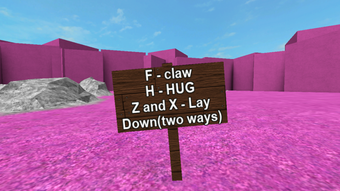

Hug Game 2.0: Free Roblox Utility App
Overview
Hug Game 2.0 is a free desktop application designed for Roblox users, developed by IcingWaters. It falls within the Utilities category and functions as a supplementary tool within the Roblox ecosystem. The app is intended to enhance user interaction in specific Roblox games by enabling the "hug" mechanic, a popular social feature in many Roblox experiences. Its primary purpose is to streamline and improve the experience of initiating hugs within Roblox environments that support this action.
Target users include Roblox players who enjoy social gameplay, particularly those participating in roleplay, community events, or games centered around interaction and emotional expression. The app may appeal to younger audiences and casual gamers seeking simple, fun interactions. While the developer did not provide detailed background information, the app's release on Softonic suggests a focus on accessibility and ease of use for a broad audience.
Real-world usage scenarios include joining Roblox events, participating in themed games, or simply engaging in lighthearted social exchanges with friends. The app operates independently of Roblox’s official client, suggesting it may function as a standalone utility to trigger in-game actions. However, exact functionality details were not specified.
Key Features & Capabilities
- Roblox Hug Mechanic Integration – Enables users to trigger the hug action within supported Roblox games without relying on in-game buttons or complex inputs.
- Lightweight Design – At 1.3 MB, the app is optimized for minimal storage use, making it suitable for users with limited disk space.
- Free Access – Available at no cost, aligning with the freemium model common in Roblox-related utilities.
- Multi-Platform Support – Compatible with both Windows and Mac operating systems, broadening its accessibility across desktop environments.
- English Language Interface – The app is currently available only in English, ensuring clarity for a global user base.
Users can launch the app while playing Roblox to quickly initiate hugs, reducing reliance on in-game mechanics. This is particularly useful in fast-paced or immersive environments where quick reactions are needed. The app may also support customizable triggers or shortcuts, though specific details were not provided.
User Interface, Workflow & Performance
The user interface of Hug Game 2.0 appears to be minimalistic, consistent with its utility-focused design. Given its small size and purpose, the interface likely features a single, intuitive control—such as a button or keyboard shortcut—to initiate the hug action. Navigation is expected to be straightforward, requiring little to no learning curve.
Workflow efficiency is likely high, as the app’s sole function is to trigger one specific action. Users can launch it quickly, connect it to their Roblox session, and execute a hug with minimal steps. The developer did not specify resource usage details, so CPU and RAM behavior cannot be confirmed. However, the 1.3 MB file size suggests low overhead and minimal impact on system performance.
Stability observations are based on general software behavior patterns. As a lightweight utility with a singular function, the app is expected to operate reliably during short sessions. Long-term performance and background behavior were not detailed. No known conflicts with other software were reported.
Compatibility & System Requirements
Hug Game 2.0 is compatible with both Windows and Mac operating systems, as stated in the provided information. The software version is listed as 0, which may indicate an early or unreleased build. The installation size is 1.3 MB, making it suitable for systems with limited storage capacity.
Exact system requirements were not listed. The developer did not provide details on minimum CPU, RAM, or graphics specifications. Compatibility with specific Windows or Mac versions is also unclear. Users should ensure their system meets general desktop application requirements for running third-party utilities.
Platform compatibility information is limited, and no information was provided about support for older or newer OS versions. The app may require an active Roblox client to function, though this was not confirmed. Users should verify that their system supports running desktop applications from external sources.
Pros and Cons
Pros
- Free to use with no hidden costs
- Small file size (1.3 MB) for quick download and installation
- Available for both Windows and Mac users
- Simple, focused functionality for a specific Roblox interaction
- English-only interface ensures clear communication
Cons
- No detailed system requirements provided
- Version number 0 may indicate instability or early development
- Only available in English
- Functionality limited to a single action (hugging)
- Developer did not provide updates or support information
FAQ Section
Is Hug Game 2.0 compatible with all Roblox games?
The app is designed for Roblox games that support the hug mechanic. It may not work in games that do not include this feature or have restricted interaction systems.
Is the app safe to download and use?
As a free utility distributed through Softonic, the app has not been independently verified for security. Users should ensure their antivirus software is active and avoid downloading from untrusted sources.
Does Hug Game 2.0 require an active Roblox account?
Yes, the app likely requires a running Roblox client and an active account to function, as it interacts with Roblox gameplay.
Can I update Hug Game 2.0 automatically?
Automatic update functionality was not specified. Users may need to manually check for new versions on the official distribution site.
Is Hug Game 2.0 available for mobile devices?
No, the app is currently only available for Windows and Mac desktop systems. There is no indication of mobile support.
Final Thoughts + CTA
Hug Game 2.0 offers a focused, lightweight solution for Roblox players seeking to enhance their social interactions through the hug mechanic. While its functionality is limited to a single action, its simplicity, free access, and cross-platform availability make it a convenient tool for casual users. The lack of detailed system requirements and the version number 0 raise some concerns about stability, but the app’s minimal footprint reduces risk for testing.
It is best suited for Roblox enthusiasts who enjoy social gameplay and value quick, easy interactions. For users seeking a no-frills utility to trigger hugs in compatible games, Hug Game 2.0 delivers a straightforward experience.
Download Hug Game 2.0 now and enhance your Roblox social moments with a single click.







